Corporate Planning Corporate Planner
What is Corporate Planning Corporate Planner?
Integrated platform for operational management, financial planning, sales management, financial consolidation, HR management and management reporting for business users. Comprehensive, predefined planning functions (with flexible capabilities for top-down and bottom-up planning) and business analyses.
Would you like to find out more about BARC reviews? Our FAQs answer the most important questions.
Corporate Planning Corporate Planner BARC Review & Rating
This section contains our independent analyst views on Corporate Planning Corporate Planner.
Provider and product description
CP Corporate Planning (CP) is a software vendor and consulting firm based in Hamburg, Germany. The company was founded in 1989 and currently employs 120 people. CP has offices in Germany, Austria, Switzerland, the Netherlands, and the UK. In 2021, the company was acquired by Proalpha, a global ERP provider focused on SMEs in manufacturing, wholesale, and other industries. Proalpha employs over 2,500 people worldwide and has more than 17,500 customers using its software.
CP offers Corporate Planner, an integrated solution for operational management, financial planning, sales management, financial consolidation, HR management, and management reporting. All modules share a common UI and are based on a three-tier architecture consisting of an integrated relational database in Microsoft SQL Server, application server, and front ends. 2,000 customers use the various modules of Corporate Planner, most of them in the DACH region. Corporate Planner and its individual modules are available in the Microsoft Azure cloud and on premises. In 2020, CP acquired Hi-Chart and has integrated its comprehensive reporting and visualization capabilities into Corporate Planner. However, it will also continue to market Reporting Studio as a standalone product for management reporting according to standards such as IBCS as well as customer-specific standards.
Corporate Planner is targeted at business departments, especially finance and controlling. The solution can be deployed as a single desktop application or as an enterprise CPM solution integrating multiple departments or companies within a group. It can be used with the Proalpha ERP suite or as a standalone application with non-Proalpha applications. Over 95 percent of customers use the product without Proalpha as a source system.
Corporate Planner’s strengths include no-code customization and wizard-driven configuration, enabling a high level of business self-service without the need for consulting support. It has comprehensive, out-of-the-box planning functionality and predefined reports and analyses that support business power users in a variety of tasks. The product provides centralized top-down planning, decentralized bottom-up planning, and a combination of both approaches. All types of planning models can be flexibly set up with Corporate Planner. The vendor does not specialize in any specific planning topic (e.g., finance, sales, HR, etc.) or industry but offers preconfigured models and templates to speed up implementation. New AI-based apps focusing on trend calculation for predictive time series forecasting, anomaly detection, and automatic account allocation (e.g., of ERP accounts to the CP data model) are scheduled for release in 2026.
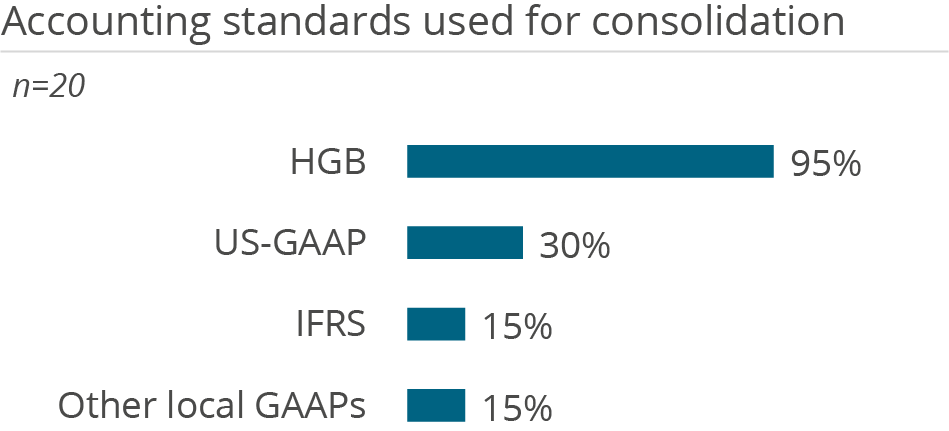
Corporate Planner supports the consolidation of actual and plan data for financial consolidation and group financial statements in compliance with all relevant accounting standards (e.g., HGB and IAS/IFRS). It is tightly integrated with the platform’s financial planning model.
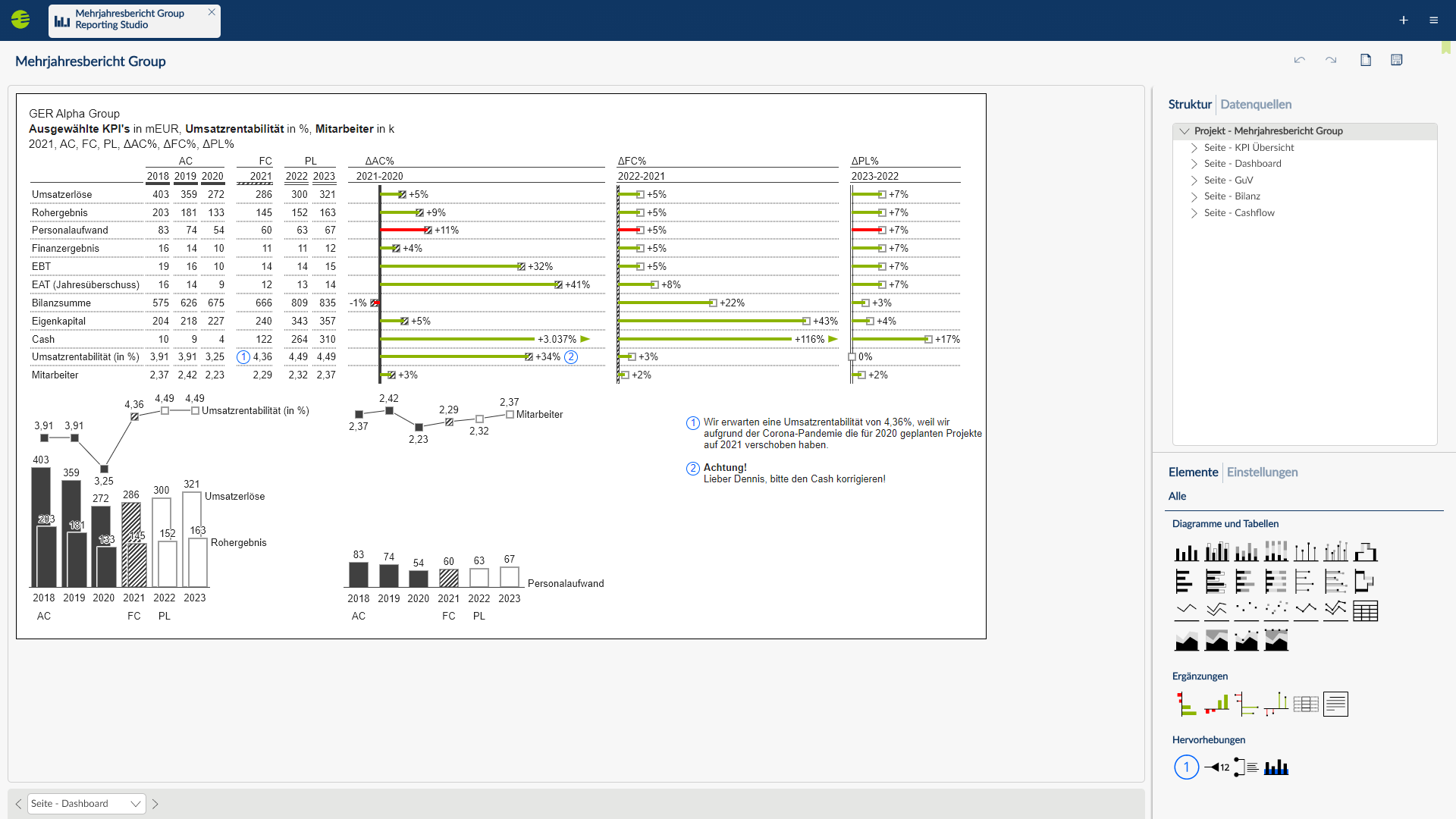
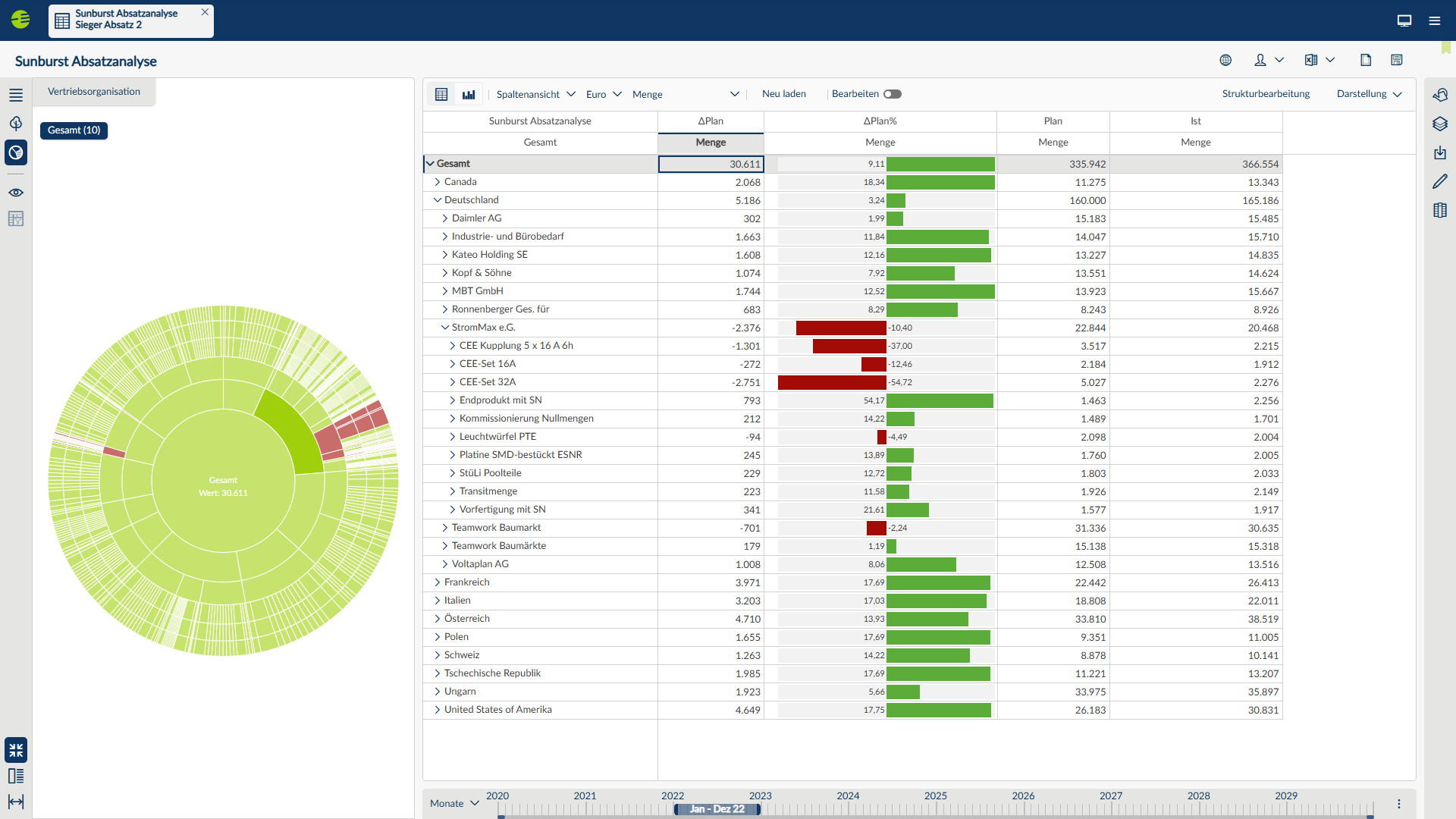
In addition to planning and consolidation capabilities, Corporate Planner offers standard and ad hoc reporting with various report types and simplified options for displaying and navigating data. It also provides a library of predefined business analyses that users can run directly on existing data. For more advanced graphical display of data, Reporting Studio’s extensive chart library is integrated into Corporate Planner’s web client to visualize data in an IBCS-compliant manner. A template library supports users in selecting the right visualization for their data. For dashboarding and advanced analysis requirements, CP pursues a ‘bring your own BI’ strategy. Qlik Sense and Microsoft Power BI can be integrated into the web client to display dashboards and analyses created with these third-party products. Furthermore, CP offers extensions for Microsoft Power BI and Qlik Sense to visualize IBCS-compliant dashboards. In both cases, Corporate Planner data is made available via an interface, which can also be used to export data to separate databases for general third-party access.

Strengths and challenges of Corporate Planning Corporate Planner
BARC’s viewpoint on the product’s strengths and challenges.
Strengths
- Integrated, no-code-platform for operational management, financial planning, sales management, financial consolidation, HR management, and management reporting for business users. Available in the Microsoft Azure cloud and on premises.
- Implementation projects are usually quick due to the product’s high degree of standardization, prebuilt business content (e.g., for financial planning, HR planning, financial consolidation) and out-of-the-box integrations with over 350 source systems.
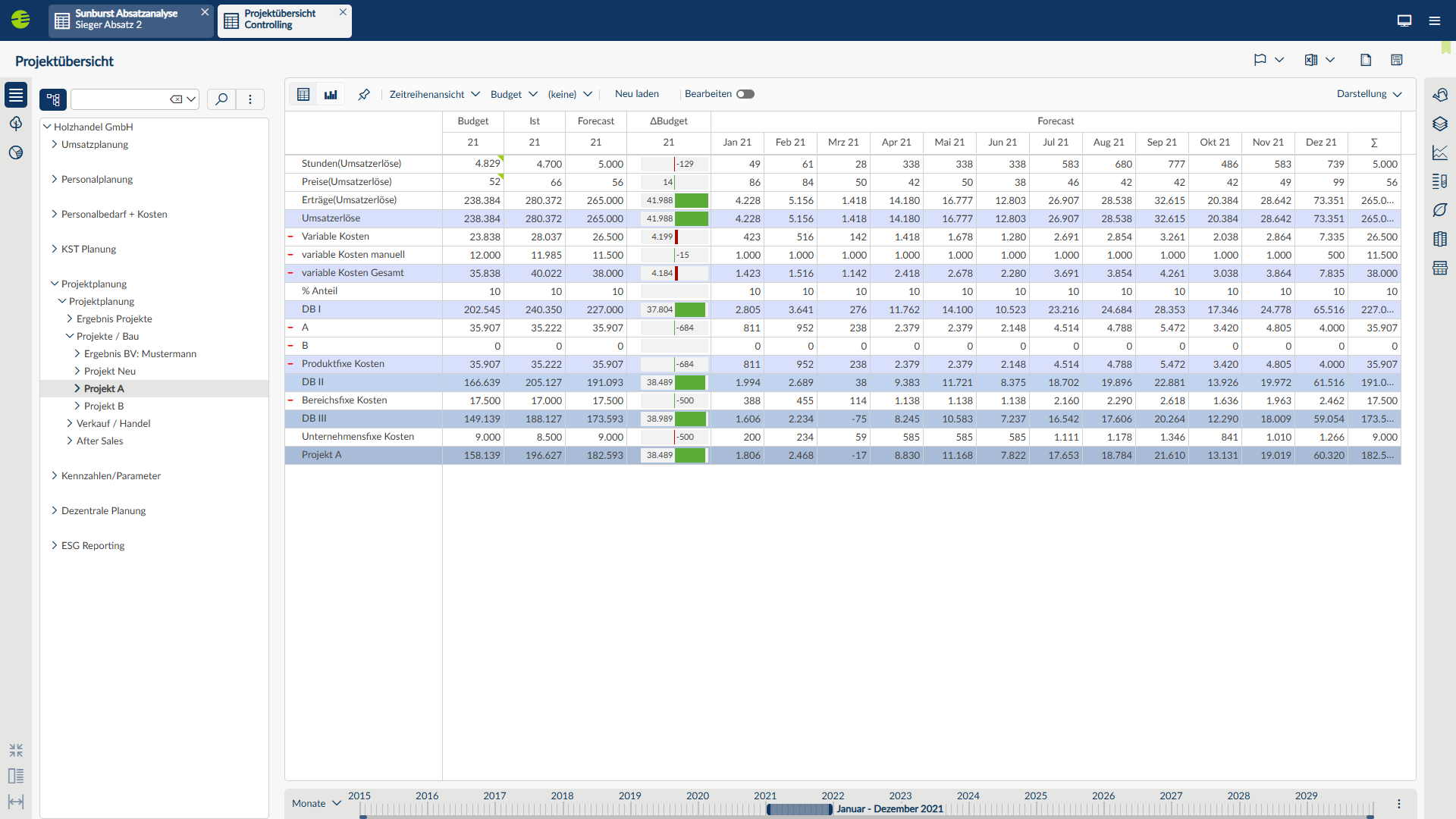
- Comprehensive, prebuilt planning functionality (with flexible top-down and bottom-up planning capabilities) and business analytics as standard. In addition, the solution enables daily and weekly planning for more accurate control and forecasting.
- Corporate Planner’s Reporting Studio in the web client provides a comprehensive chart library with IBCS-compliant data visualization capabilities and custom visualization standards.
Challenges
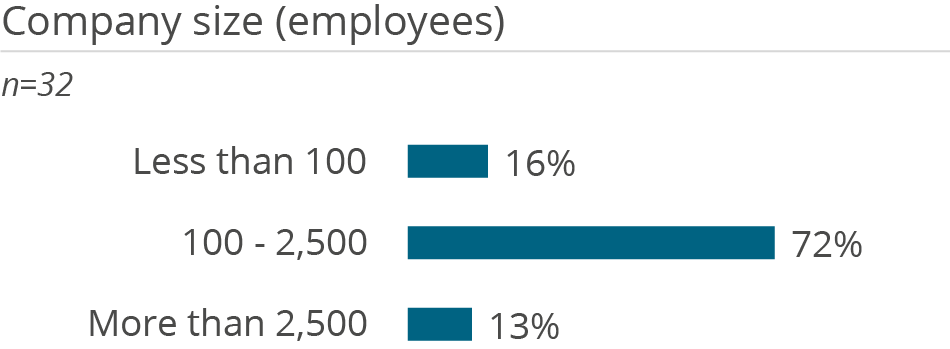
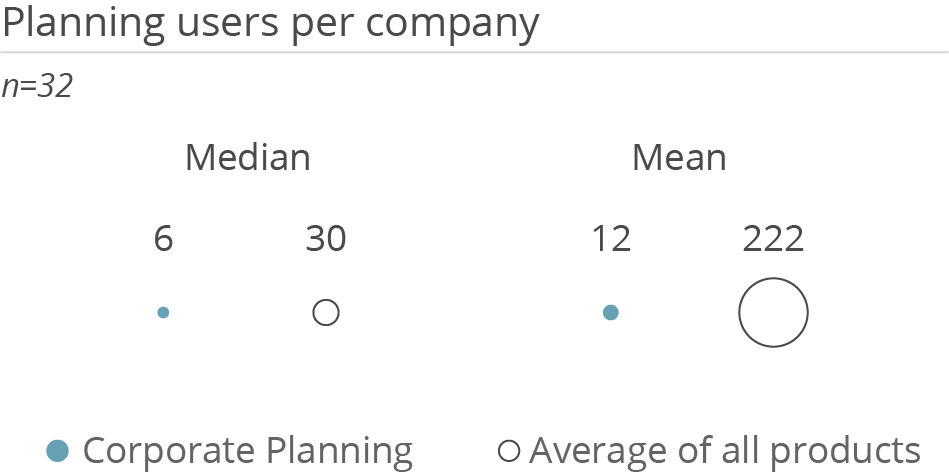
- Typically used in small to medium-sized and departmental scenarios. Across the entire customer base, Corporate Planner is used by an average of 10-50 users per installation, but some customers also use it with significantly larger numbers of users. According to CP, implementation projects are growing in terms of numbers of users and data volumes. Enterprise customers with larger scenarios should evaluate similar references.
- Corporate Planner is currently undergoing a technical transition toward a full-featured web client. Although more and newer features are delivered in the web client, operational functions can be found in both the web and full clients. The full client focuses on administration and modeling, while the web client provides capabilities for IBCS-compliant reporting, analysis, data visualization, content creation, and planning tasks. Currently, the web and Windows clients have different UIs/UXs.
- Corporate Planner itself offers limited capabilities for dashboards and (advanced) analytics. For such use cases, Qlik Sense and Microsoft Power BI can be integrated into the Corporate Planner web client. CP has a strategic partnership with Qlik, and Qlik Sense is also sold as an OEM version together with Corporate Planner.
- According to feedback in The Planning Survey 26, few customers currently use CP for innovative use cases such as AI-powered planning. Product development focuses strongly on technological and functional enhancements and solutions for existing customers, which often address the product’s business value and functionality rather than the latest market trends.
Corporate Planning Corporate Planner User Reviews & Experiences
The information contained in this section is based on user feedback and actual experience with Corporate Planning Corporate Planner.
The information and figures are largely drawn from BARC’s The BI & Analytics Survey, The Planning Survey, The Financial Consolidation Survey and The Data Management Survey. You can find out more about these surveys by clicking on the relevant links.
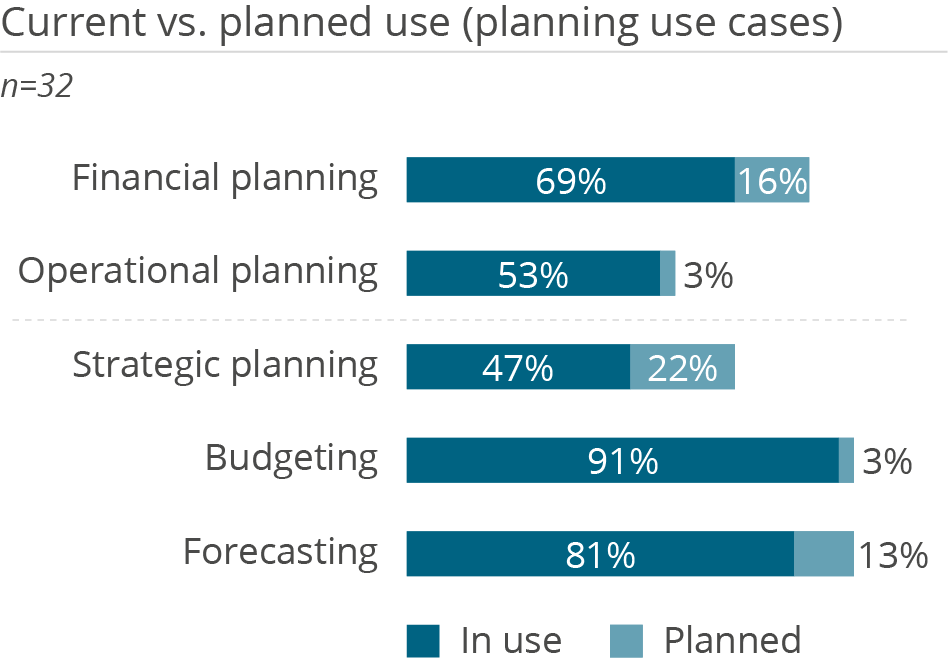
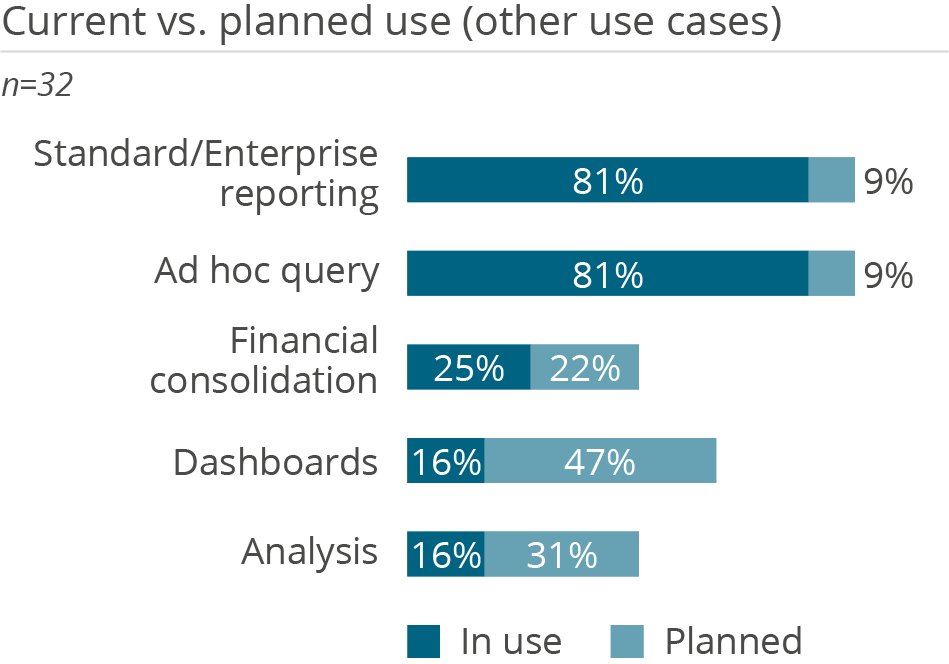
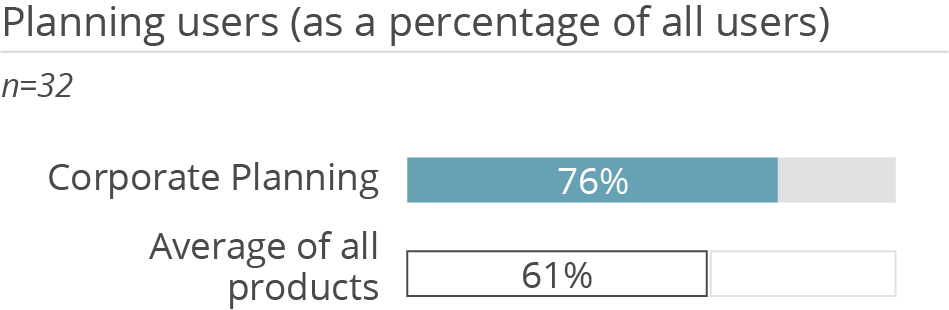
Who uses Corporate Planning Corporate Planner in a planning context and how
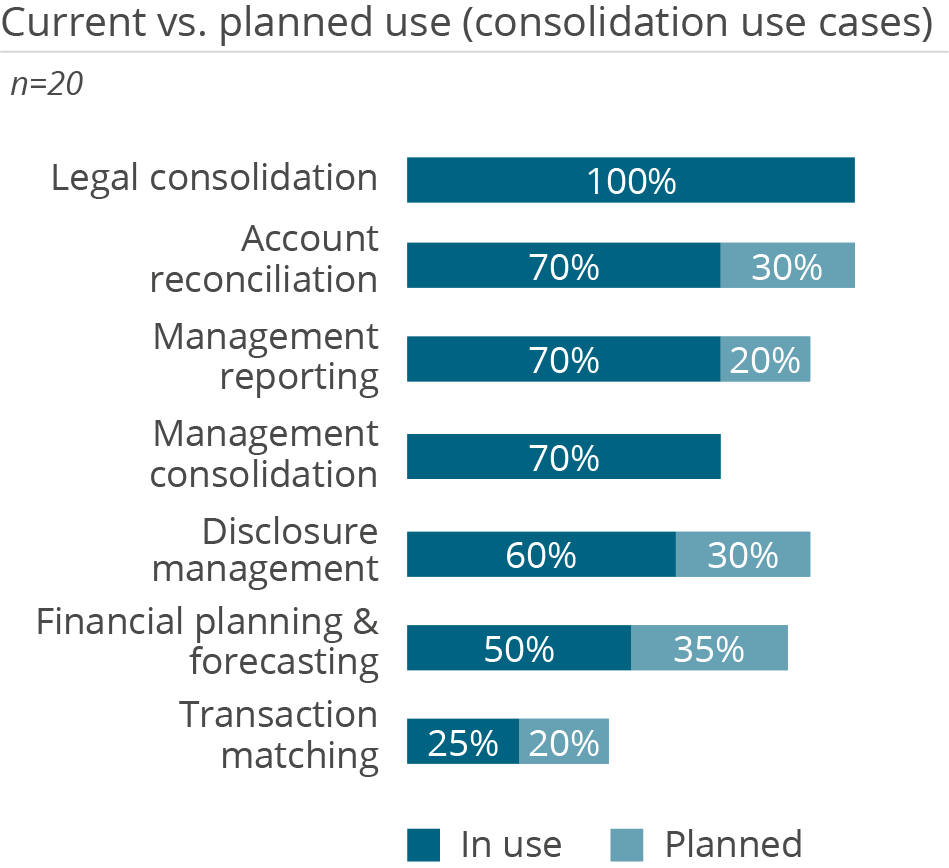
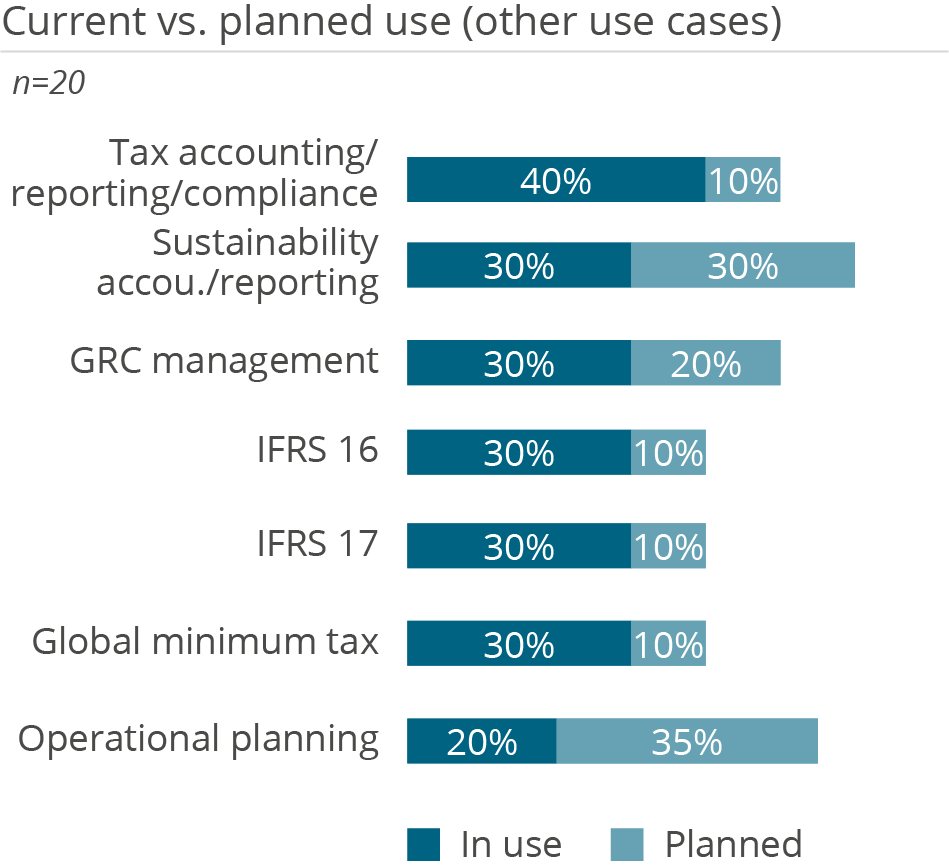
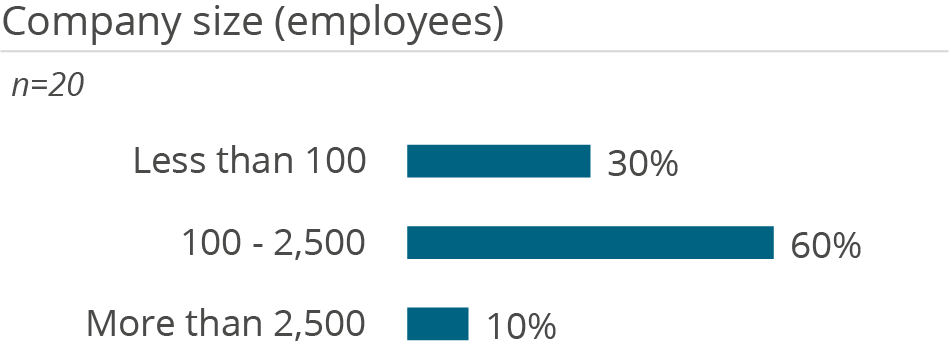
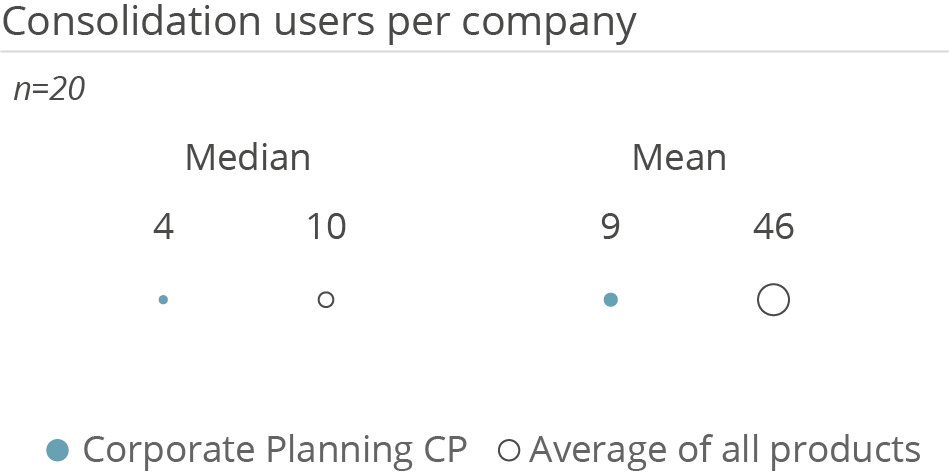
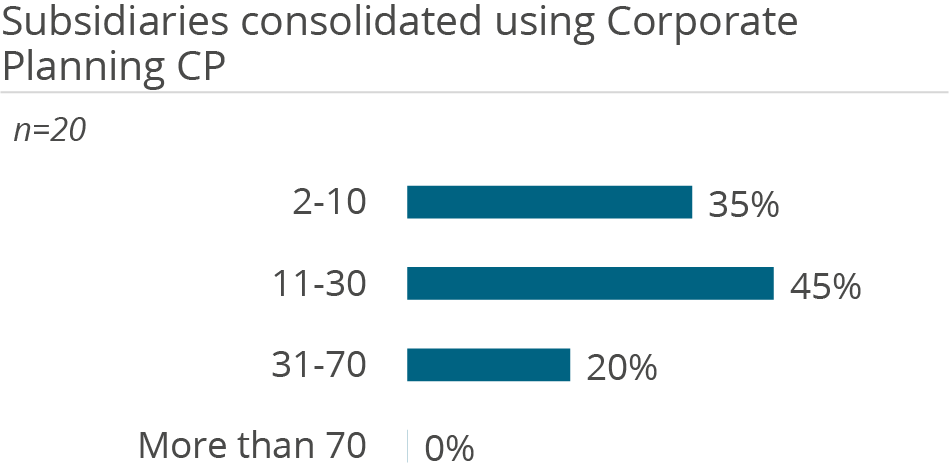
Who uses Corporate Planning Corporate Planner in a financial consolidation context and how
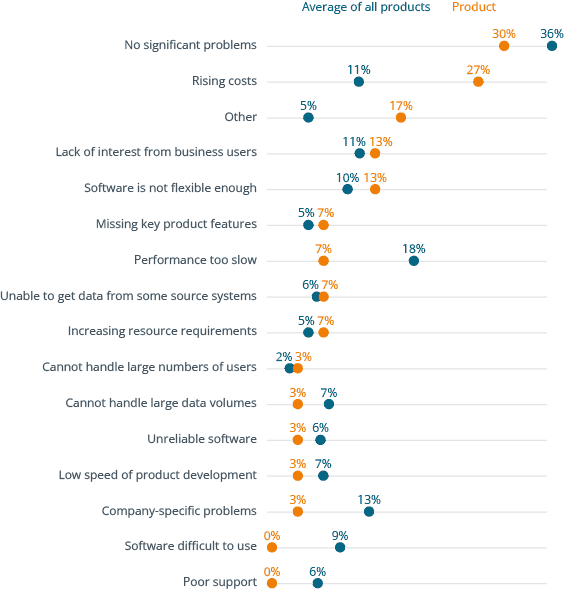
Why users buy Corporate Planning Corporate Planner and what problems they have using it
- Get independent information on software solutions, market developments and trends in data, analytics, business intelligence, data science and corporate performance management.
- Make data & analytics decisions based on numbers, data, facts and expert knowledge
- Access to all premium articles and all our research, including all software comparison studies, scores and surveys.
- Unlimited access to the BARC media library
- Consume unlimited content anywhere
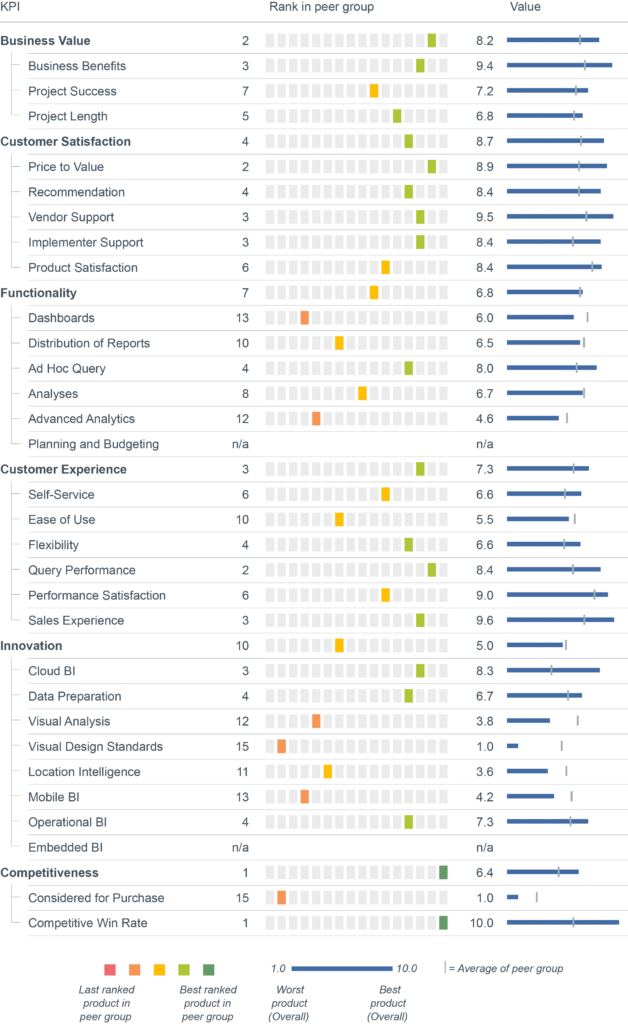
Full user reviews and KPI results for Corporate Planning Corporate Planner
All key figures for Corporate Planning Corporate Planner at a glance.
- Get independent information on software solutions, market developments and trends in data, analytics, business intelligence, data science and corporate performance management.
- Make data & analytics decisions based on numbers, data, facts and expert knowledge
- Access to all premium articles and all our research, including all software comparison studies, scores and surveys.
- Unlimited access to the BARC media library
- Consume unlimited content anywhere
Individual user reviews for Corporate Planning Corporate Planner
Number of employees
Industry
Source
What do you like best?
Flexibler Strukturaufbau.
What do you like least/what could be improved?
–
What key advice would you give to other companies looking to introduce/use the product?
Den Aufbau der Strukturen mit Hilfe der CP-Experten gemeinsam entwickeln und umsetzen
How would you sum up your experience?
Wir sind damit sehr zufrieden.
Number of employees
Industry
Source
What do you like best?
Die Flexibilität.
What do you like least/what could be improved?
Support eher langsam und über Monate keine Lösung für Performanceprobleme gefunden.
What key advice would you give to other companies looking to introduce/use the product?
Vorher gut planen, was genau man im CP abbilden möchte, aber die Strukturen so einfach wie möglich aufbauen.
How would you sum up your experience?
Ein sehr flexibles Tool mit vielen Möglichkeiten, das aber viel Bedienerkompetenz, also Fachwissen zu den Funktionen und Möglichkeiten des Tools, erfordert.
Number of employees
Industry
Source
What do you like best?
Nutzerfreundliche Oberfläche. Schnelligkeit zwischen Dateneingaben und Ergebnissen. Gleichzeitiges Arbeiten möglich. Integration operative Planungen mit der Finanzplanung. Flexibilität der Planung durch Logikbausteine.
What do you like least/what could be improved?
Umgang mit Wechselkursen und Fremdwährungen. Konsolidierungstool ist nicht ans Reportingtool Excel-Plus angebunden.
What key advice would you give to other companies looking to introduce/use the product?
Mittels User-Stories den genauen Bedarf klären und vorher die Ist-Daten (Konten, Kostenstellen, ...) aufräumen und bei einer Konzernstruktur sich einen einheitlichen Konzernkontenrahmen überlegen.
How would you sum up your experience?
Sehr engagierte Berater, immer lösungsorientiert und hilfsbereit, auch wenn das Projekt abgeschlossen ist. Die Arbeit mit CP macht Spaß und neue Mitarbeiter können schnell in die Software eingeführt werden.
Number of employees
Industry
Source
What do you like best?
Logisch aufgebaut.
What do you like least/what could be improved?
Administration vereinfachen.
What key advice would you give to other companies looking to introduce/use the product?
Vorab Prozesse klären und Schulungen durchführen - Direkt damit arbeiten
How would you sum up your experience?
Licht und Schatten.
Number of employees
Industry
Source
What do you like best?
Flexibilität der Kalkulationen.
What do you like least/what could be improved?
User- und Dateimanagement.
What key advice would you give to other companies looking to introduce/use the product?
Sehr genaue Planung der zukünftigen Anforderungen und deren Berücksichtigung bei dem Strukturaufbau.
How would you sum up your experience?
Bei entsprechender fachlicher Kompetenz des Users ein sehr gutes Tool zur Planung und zum Forecasting, das sehr flexibel individuelle Anforderungen unterstützt (CP OC).
Number of employees
Industry
Source
What do you like best?
Intuitive Benutzeroberfläche, Ad-hoc-Tabelle, Analysefunktionen, viele Datenebenen.
What do you like least/what could be improved?
Komplexes Fachwissen für die Struktur- und Datenpflege erforderlich.
What key advice would you give to other companies looking to introduce/use the product?
Benutzer sehr gut schulen.
How would you sum up your experience?
Sehr gut.
Number of employees
Industry
Source
What do you like best?
Einfache und gut verständliche Oberfläche, welche die Einarbeitung von Kollegen unterstützt.
What do you like least/what could be improved?
Fehlende Flexibilität in Strukturen und fehlende Funktionen zur automatischen Übernahme bereits bestehender Strukturen auf neue Gesellschaften.
What key advice would you give to other companies looking to introduce/use the product?
IT-Systemlandschaft und IT-Architektur genau prüfen und ggf. in einem Vorprojekt diese auf einen zeitgemäßen Stand bringen. Chaos in den Vorsystemen lässt sich auch durch eine neue Software nicht lösen.
How would you sum up your experience?
Sehr zufrieden, vor allem auch durch die äußerst kompetente Betreuung seitens CP.