Phocas BI and financial planning platform
What is Phocas BI and financial planning platform?
Platform focused on analytics, financial statements and budgets & forecasts, specifically interesting for distribution, manufacturing and retail industries.
Self-description of Phocas BI and financial planning platform
Would you like to find out more about BARC reviews? Our FAQs answer the most important questions.
Phocas BI and financial planning platform BARC Review & Rating
This section contains our independent analyst views on Phocas BI and financial planning platform.
Provider and product description
Phocas was founded in 2001 as a business intelligence (BI) company offering software and professional services. The vendor is headquartered in Sydney, Australia and has additional offices in Australia, New Zealand, the United States, and the United Kingdom. Phocas has more than 300 employees and serves approximately 2,900 customers worldwide. In October 2025, Accel-KKR acquired a majority equity stake in the company.
Phocas primarily targets midsize organizations in manufacturing, wholesale distribution, and retail. Building on its BI and analytics foundation, the vendor has expanded into financial reporting, planning, budgeting, and forecasting. Today, it offers an integrated BI and financial planning and analysis (FP&A) platform that connects operational and financial data. Integration with ERP systems is central to its positioning, making business data accessible to users across sales, purchasing, inventory, finance, and management.
The overall portfolio comprises Phocas Analytics, Financial Statements, Budgets and Forecasts, Rebates, CRM, and Sales Insights. These products combine capabilities for performance analysis, financial reporting, planning, rebate management, and customer relationship management. Sales Insights is an add-on to Phocas Analytics that helps sales teams identify customer risks and revenue opportunities. Customers can combine products according to their business requirements.
Phocas Analytics is the core BI & analytics platform, providing ad hoc query, reporting, and dashboard capabilities for business users. It brings together data from ERP and other business systems to support use cases such as identifying sales opportunities, analyzing customer and product profitability, and monitoring inventory performance. Users can freely explore data in an interactive grid, compare results across customers, products, and branches, and drill down from summary views to individual transactions. Self-service capabilities allow users to create and save reports, dashboards, and alerts. Integration with the wider portfolio extends this analytical foundation into financial reporting and planning.
Recent product development has centered on Flex Mode, a new analytics experience built on a new technology stack. Enhancements include conditional formatting, calculated columns with Excel-like formulas, and alerts. Users can save analytical views as favorites and move from dashboards into the analytics grid for further investigation. Phocas is also developing a new dashboard experience, which is currently in beta. Phocas AI enables users to explore business data through natural language queries and shows the steps behind its answers. An MCP server for connecting external AI tools to Phocas data is announced as forthcoming.
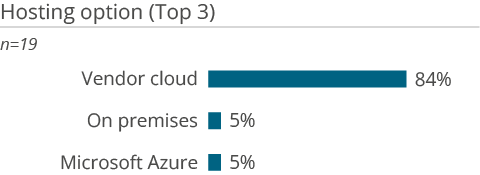
Phocas is delivered as a cloud-based SaaS offering hosted on Amazon Web Services. The vendor advertises integration with more than 200 data sources, including ERP, CRM, and financial systems, and provides implementation services to connect, map, and validate customer data.
Strengths and challenges of Phocas BI and financial planning platform
BARC’s viewpoint on the product’s strengths and challenges.
Strengths
- Business-user-oriented BI and analytics platform with flexible ad hoc filtering, an interactive analysis grid, and drill-down from dashboards to transaction-level detail.
- Industry-focused offering for manufacturing, wholesale distribution, and retail, combining ERP integration, built-in dashboards, customizable reports, and implementation support.
- Integration with more than 200 data sources, enabling users to analyze operational and financial information across sales, purchasing, inventory, and finance.
- Integrated portfolio that allows customers to extend BI and analytics into financial reporting, budgeting and forecasting, rebate management, and sales-related applications.
Challenges
- Cloud-only offering. Organizations requiring an on-premises deployment will need to consider alternative solutions.
- The vendor’s industry specialization is strongest in manufacturing, wholesale distribution, and retail. Organizations in other sectors should assess the fit of the available content, ERP integrations, and implementation expertise with their requirements.
- Limited AI and predictive capabilities but AI services are increasingly being integrated.
- Visualization capabilities are more limited than those of leading BI and analytics products.
Phocas BI and financial planning platform User Reviews & Experiences
The information contained in this section is based on user feedback and actual experience with Phocas BI and financial planning platform.
The information and figures are largely drawn from BARC’s The BI & Analytics Survey, The Planning Survey, The Financial Consolidation Survey and The Data Management Survey. You can find out more about these surveys by clicking on the relevant links.
Summary of user review highlights from Phocas BI and financial planning platform
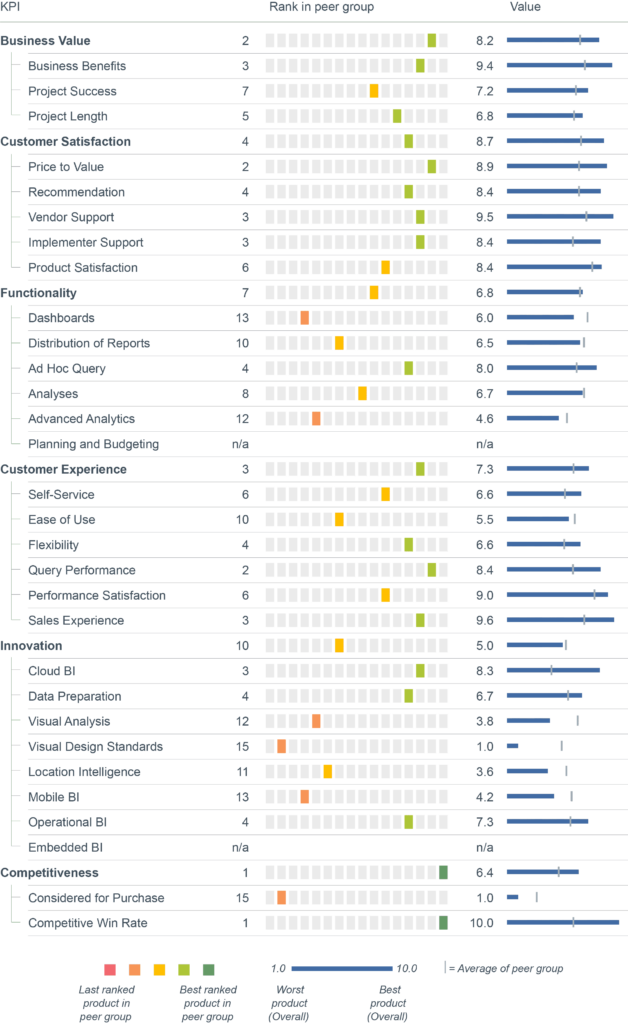
What users like about Phocas BI and financial planning platform and where the product scores best in a user comparison.
Who uses Phocas BI and financial planning platform in a planning context and how
Who uses Phocas BI and financial planning platform in a BI & analytics context and how
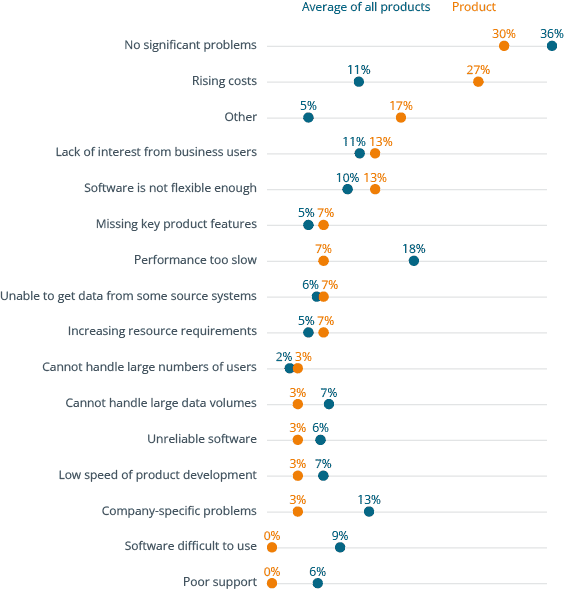
Why users buy Phocas BI and financial planning platform and what problems they have using it
- Get independent information on software solutions, market developments and trends in data, analytics, business intelligence, data science and corporate performance management.
- Make data & analytics decisions based on numbers, data, facts and expert knowledge
- Access to all premium articles and all our research, including all software comparison studies, scores and surveys.
- Unlimited access to the BARC media library
- Consume unlimited content anywhere
Full user reviews and KPI results for Phocas BI and financial planning platform
All key figures for Phocas BI and financial planning platform at a glance.
- Get independent information on software solutions, market developments and trends in data, analytics, business intelligence, data science and corporate performance management.
- Make data & analytics decisions based on numbers, data, facts and expert knowledge
- Access to all premium articles and all our research, including all software comparison studies, scores and surveys.
- Unlimited access to the BARC media library
- Consume unlimited content anywhere
Individual user reviews for Phocas BI and financial planning platform
Number of employees
Industry
Source
What do you like best?
Integration with Epicor Kinetic.
What do you like least/what could be improved?
Inconsistent KPIs tied to Epicor Kinetic.
What key advice would you give to other companies looking to introduce/use the product?
–
How would you sum up your experience?
Good tool and value-priced.
Number of employees
Industry
Source
What do you like best?
Fast and intuitive interface for users.
What do you like least/what could be improved?
Limited visuals.
What key advice would you give to other companies looking to introduce/use the product?
Understand first how it can sync from SharePoint.
How would you sum up your experience?
Very good company to work with.
Number of employees
Industry
Source
What do you like best?
It’s the king of ad hoc analysis systems: highly flexible and user-friendly. The ability to drill down to transaction-level detail and back up to high-level numbers in one or two clicks is great for non-technical users.
What do you like least/what could be improved?
–
What key advice would you give to other companies looking to introduce/use the product?
Book a session as soon as possible. It is an amazing analysis tool from a company that wants to collaborate with you on your company’s vision.
How would you sum up your experience?
Very good, trustworthy, and eager to collaborate with you. They are always willing to go the extra mile.
Number of employees
Industry
Source
What do you like best?
The ad hoc table in Analytics. You can quickly derive any table from it.
What do you like least/what could be improved?
CRM. The lack of secondary owners and other issues leave the CRM underpowered.
What key advice would you give to other companies looking to introduce/use the product?
Make sure all users receive initial training, and the barriers to use will be significantly reduced.
How would you sum up your experience?
Good software, with great support for data integration, especially for people who do not have a background in this field.
Number of employees
Industry
Source
What do you like best?
Simplicity of the frontend for Favorites and Dashboards.
What do you like least/what could be improved?
–
What key advice would you give to other companies looking to introduce/use the product?
Talk to them. They are open to any questions and have an extremely positive mindset.
How would you sum up your experience?
An exceptional tool that will enhance your knowledge of your own company and enable you to make meaningful commercial decisions.
Number of employees
Industry
Source
What do you like best?
The product is brilliant, but more importantly, the support, technical knowledge, and flexibility are excellent.
What do you like least/what could be improved?
CRM, but this is now being adapted to our requirements.
What key advice would you give to other companies looking to introduce/use the product?
Don’t hesitate to work with them, and make sure you reach out for technical support. It is absolutely brilliant.
How would you sum up your experience?
Fantastic company to work with.
Number of employees
Industry
Source
What do you like best?
Very efficient query speeds. Easy to operate at a basic level, though obviously more technical at the analysis level.
What do you like least/what could be improved?
The on-screen display is not as adjustable as in other BI tools, and column sorting is not easily done at the user level.
What key advice would you give to other companies looking to introduce/use the product?
I would encourage them to purchase it. It is reliable and fast.
How would you sum up your experience?
Brilliant product and magnificent support team.
Number of employees
Industry
Source
What do you like best?
Ease of use.
What do you like least/what could be improved?
Link CRM activity to business performance.
What key advice would you give to other companies looking to introduce/use the product?
Make sure that you test all functionality.
How would you sum up your experience?
Very Good.
Number of employees
Industry
Source
What do you like best?
Data extraction from different data tables into one Excel file.
What do you like least/what could be improved?
The search function is very rigid and restrictive depending on which screen I am using, and it often returns no results when searching for text.
What key advice would you give to other companies looking to introduce/use the product?
It's ok for dashboard metrics and thus KPI measurement of branch/sales managers.
How would you sum up your experience?
It's good. It's fast.
Number of employees
Industry
Source
What do you like best?
Interface.
What do you like least/what could be improved?
Reporting and filtering.
What key advice would you give to other companies looking to introduce/use the product?
Phocas is a great tool for quick reporting.
How would you sum up your experience?
It’s very reliable and easy-to-use software with a good interface and user experience.
Number of employees
Industry
Source
What do you like best?
Ease of use for answering questions quickly.
What do you like least/what could be improved?
Ability to update data more effectively across the multiple data sources connected to Phocas.
What key advice would you give to other companies looking to introduce/use the product?
Don’t feel that you have to roll out all the modules you plan to use at once. It is very easy to add them as you go, which will help with business adoption.
How would you sum up your experience?
Great piece of software, not just a BI tool, but also an ERP system in its own right to a certain extent.
Number of employees
Industry
Source
What do you like best?
Any questions are dealt with promptly, communication is excellent, the tool is very easy to use, reports are easy to share, and it is quite easy to manipulate the data to achieve the desired results.
What do you like least/what could be improved?
Needs better integration capabilities, cannot connect to Slack, and lacks Excel-like functionality in the main analytics module.
What key advice would you give to other companies looking to introduce/use the product?
An amazing tool that can increase your company’s data usage from 10–15% to 80%. For those aiming for 90–100% data usage and exploration, it may have some limitations, although it most certainly has its place in every company.
How would you sum up your experience?
Great, lovely company to partner with.
Number of employees
Industry
Source
What do you like best?
Ease of use.
What do you like least/what could be improved?
The legacy analytics are being phased out, but Flex modes don’t yet have dashboard functionality.
What key advice would you give to other companies looking to introduce/use the product?
Do it!
How would you sum up your experience?
It’s a great software and company that is moving quickly to be great!
Number of employees
Industry
Source
What do you like best?
Being able to compile data from the ERP system.
What do you like least/what could be improved?
Better ease of use; it takes a long time to learn how to use.
What key advice would you give to other companies looking to introduce/use the product?
Spend time learning how to use it.
How would you sum up your experience?
It's okay.
Number of employees
Industry
Source
What do you like best?
Ease of use.
What do you like least/what could be improved?
Ability to schedule reports and send them by email.
What key advice would you give to other companies looking to introduce/use the product?
Do it. Great product.
How would you sum up your experience?
Very good.
Number of employees
Industry
Source
What do you like best?
It pulls data significantly faster than the BI tools built into our ERP system and doesn't tie up system resources. I also like the ability to quickly manipulate the date to find the exact information a user is looking for.
What do you like least/what could be improved?
–
What key advice would you give to other companies looking to introduce/use the product?
It is well worth the investment.
How would you sum up your experience?
It is a great product that allows me to quickly create reports and datasets that users can immediately act on.
Number of employees
Industry
Source
What do you like best?
Ease of running reports, slicing and dicing data, and turning data into graphs. Budget setting and tracking.
What do you like least/what could be improved?
Sometimes it is rigid, and there is no easy way to do something a little differently.
What key advice would you give to other companies looking to introduce/use the product?
Ensure you know which questions you want answered so you can set up the system correctly.
How would you sum up your experience?
Love the product.
Number of employees
Industry
Source
What do you like best?
Ease of use and back-button support!
What do you like least/what could be improved?
Building a database is very complex.
What key advice would you give to other companies looking to introduce/use the product?
Once trained and operational, it is very easy to keep moving forward with it.
How would you sum up your experience?
Very user-friendly BI tool.
Number of employees
Industry
Source
What do you like best?
Flexible system. Non-IT staff can design new databases and dashboards. Data is presented graphically and easily. Budgeting is easy to perform.
What do you like least/what could be improved?
Synchronising systems and adding new fields to databases. The option to specify in the instructions that users may add certain fields themselves, within reasonable limits.
What key advice would you give to other companies looking to introduce/use the product?
Training of staff on implementation to improve adoption and uptake.
How would you sum up your experience?
Very good software. Forecasting and planning capabilities.
Number of employees
Industry
Source
What do you like best?
It's relatively simple and easy to use.
What do you like least/what could be improved?
There is not enough training on how to use the product, or it can be non-straightforward to learn.
What key advice would you give to other companies looking to introduce/use the product?
Spend as much time learning from implementation consultants as possible.
How would you sum up your experience?
It's great.
Number of employees
Industry
Source
What do you like best?
Navigation and data manipulation.
What do you like least/what could be improved?
Support can be improved. We need to follow up frequently on tickets submitted. Also, better training to improve understanding and to better use the Phocas software.
What key advice would you give to other companies looking to introduce/use the product?
Phocas is a solid solution to consider for business analytics.
How would you sum up your experience?
Phocas is a tremendous software program that simplifies the analysis and conversion of business data for users across all departments.
Number of employees
Industry
Source
What do you like best?
Ease of use. Great vendor support.
What do you like least/what could be improved?
API connector can be hard to use; speed for large volumes could be improved; better dashboards.
What key advice would you give to other companies looking to introduce/use the product?
Make sure your use cases are clear to assist in ensuring that, on rollout, the business users know what they should use Phocas for.
How would you sum up your experience?
Great software with passionate people behind the product.
Number of employees
Industry
Source
What do you like best?
Ease of use, flexibility of data manipulation and speed.
What do you like least/what could be improved?
Inability to pull data from an existing report. Cashflow is too rigid; should be a user‑defined statement.
What key advice would you give to other companies looking to introduce/use the product?
It's a game changer, providing accurate financials (no spreadsheet errors) and rapid analytical data for sales, margins, etc.
How would you sum up your experience?
It is very good, and after a little setup it is a very powerful tool that we would not be without.
Number of employees
Industry
Source
What do you like best?
Ability to copy datasets.
What do you like least/what could be improved?
Free format comments are difficult to extract from the system.
What key advice would you give to other companies looking to introduce/use the product?
Understand its limitations before using.
How would you sum up your experience?
Overall good, but is complicated to use at times.
Number of employees
Industry
Source
What do you like best?
Easy-to-understand reports and dashboards that it pulls from our ERP system Palladium.
What do you like least/what could be improved?
The cost. It isn't cheap if you want more people to have access to it.
What key advice would you give to other companies looking to introduce/use the product?
Think carefully if it's relevant to your situation.
How would you sum up your experience?
Positive. Our monthly management accounts are now far more reliable than they ever were.
Number of employees
Industry
Source
What do you like best?
Ease of use and customisation.
What do you like least/what could be improved?
Very large workbooks can be a bit slower to load.
What key advice would you give to other companies looking to introduce/use the product?
Don't build too many dashboards too soon, and control who can build in the early days.
How would you sum up your experience?
Excellent product.
Number of employees
Industry
Source
What do you like best?
Drives self‑sufficiency in the business. Data is with the people who make decisions. Easy access to data.
What do you like least/what could be improved?
More reporting graphs.
What key advice would you give to other companies looking to introduce/use the product?
Ensure you have solid data definitions.
How would you sum up your experience?
Very good tool. Drives data‑driven decisions.
Number of employees
Industry
Source
What do you like best?
Reliability, ability to audit, consolidation.
What do you like least/what could be improved?
The budgets module can be slow.
What key advice would you give to other companies looking to introduce/use the product?
Know what you need from Phocas up front.
How would you sum up your experience?
It's been a good tool, reduced manual errors, and is overall easy to use.
Number of employees
Industry
Source
What do you like best?
Its versatility across multiple formats - i.e., sales BI, customers sales BI, finance module and forecasting and budgeting integration.
What do you like least/what could be improved?
It seems like the budgeting and forecasting module is still in the early stages of development despite being the most expensive subscription.
What key advice would you give to other companies looking to introduce/use the product?
Depending on the level of forecasting and complexity they are after, I may recommend a different tool. It is all dependent if they use the sales, ordering, consumer data BI tool because in conjunction with the finance tool is what makes the forecasting module suitable as it integrates very easily - even if building the forecasting / budget can be a bit cumbersome.
How would you sum up your experience?
Excellent BI and finance tool cannot wait to get the forecasting module up to the same level
Number of employees
Industry
Source
What do you like best?
Product is evolving and improving. Ability to interface with ERP and financial DBs. Support specialists are knowledgeable and enthusiastic.
What do you like least/what could be improved?
User interface is not intuitive to casual user. Tool tips, function hints, etc. are missing. For us, planning and forecasting are executive tasks, not a staffed department. Forecasting and planning elements are heavily dependent upon formats (i.e., financial layout) defined outside of forecasting component. Appears to be unable to import Excel or CSV data for planning data.
What key advice would you give to other companies looking to introduce/use the product?
–
How would you sum up your experience?
Because it is primarily an analytic tool that works well without ERP system, the forecasting feature is a useful addition. I would not position Phocas as a forecasting software.
Number of employees
Industry
Source
What do you like best?
Ability to utilize data from ERP system to bridge financial and operational reporting. In person assistance is usually very good. It is clear that if you live in the Phocas world all the time it offers significant flexibility and performance, but requires nuanced knowledge of the context, tools and data construction to create those results.
What do you like least/what could be improved?
Documentation appears to often be outdated. Error messages provide no guidance resolve issues. Training is generally task driven rather than explaining context and design considerations for planning components. User interface needs to be relearned each year as tool tips are rare, context often determines what options or selections are available, shortcut keys are limited, etc. No ability to import from Excel; minimal documentation on what operational streams of planning data might be available for performance measurement during the year (SKU? By Customer? By Pdt Group? By Region?).
What key advice would you give to other companies looking to introduce/use the product?
Support and consultant training is good but expensive. If you're ERP system has inflexible crap reporting, Phocas can provide a good solution.
How would you sum up your experience?
Seems to spend a lot of time trying to re-invent features already in Excel Graphing is weak and color selection non-existent (and not colorblind appropriate). Widgets are rudimentary and unable to draw information from multiple sources for analysis (inventory and sales). Basic performance of DB analytics is solid but user interfaces are far from intuitive.
Number of employees
Industry
Source
What do you like best?
Ease of drilling into the numbers and the way it the numbers flow from the P&L/Balance sheet right down to product/customer/supplier level.
What do you like least/what could be improved?
It would be good if there was better documentation within Phocas on how to use each area of the system.
What key advice would you give to other companies looking to introduce/use the product?
It is very powerful once you have it set up but there is a bit of work involved. To get the best out of the software you really need an internal IT person who can set up the reports and dashboards etc.
How would you sum up your experience?
Very good tool.
Number of employees
Industry
Source
What do you like best?
Ease of use.
What do you like least/what could be improved?
More flexibility around budgeting (or specific knowledge of doing so).
What key advice would you give to other companies looking to introduce/use the product?
Go for it.
How would you sum up your experience?
Love it. Sales, purchasing and financials used every day. Still learning Budgeting and Forecasting.
Number of employees
Industry
Source
What do you like best?
That everyone can prepare and see their budgets, and then their actuals are imported every night, so they always know where they are at within their budgets.
What do you like least/what could be improved?
Not much!
What key advice would you give to other companies looking to introduce/use the product?
Get the drivers setup during the overall setup. We went around our payroll driver because of the time it would take, now we're playing catchup this year trying to get it up and going. We still have great support, but having it done initially would have been ideal.
How would you sum up your experience?
I like Phocas and have recommended it to several other companies in my industry (Food Banking).
Number of employees
Industry
Source
What do you like best?
Flexible and very good support team.
What do you like least/what could be improved?
Integration between analytics and budgeting and forecast models.
What key advice would you give to other companies looking to introduce/use the product?
Do it!
How would you sum up your experience?
Excellent and more user friendly than Power BI/Other BI products.
Number of employees
Industry
Source
What do you like best?
Low barrier of entry for general users. Background setup for analytics is very user friendly and easy to build upon.
What do you like least/what could be improved?
Limited design options for graphs.
What key advice would you give to other companies looking to introduce/use the product?
Would recommend given the usability and team doing the implementation are very diligent in completing an integration.
How would you sum up your experience?
Good company, great product with exciting advances incoming with the implementation of AI.
Number of employees
Industry
Source
What do you like best?
.
What do you like least/what could be improved?
Keep working on improving the ease of use of all the functions of the software.
What key advice would you give to other companies looking to introduce/use the product?
Invest the time in setting it up to maximize the ease of use. I.E favorite reports that provide simple clear information.
How would you sum up your experience?
A very good product that value adds to the overall business.
Number of employees
Industry
Source
What do you like best?
Ease of use for all levels of users.
What do you like least/what could be improved?
Budgeting and forecasting needs some work to be able to display individual budgets.
What key advice would you give to other companies looking to introduce/use the product?
Do it.
How would you sum up your experience?
Great program that has saved us a lot of time and provided great analytical tools that would have taken us hours or even days to produce.
Number of employees
Industry
Source
What do you like best?
Flexibility and speed to get detailed forecasts.
What do you like least/what could be improved?
Can’t add in easily a new dimension you don’t have to see if it will work for budgeting. NI in the UK can.t be easily calculated through the payroll headcount function due to the levels and functions on that calc. We have a couple of companies, one database for sales and 2 for finance, currently looking at restructuring, hard to see budgets for different scenarios
What key advice would you give to other companies looking to introduce/use the product?
Embrace it and use it every day.
How would you sum up your experience?
Good evolving functionalities.
Number of employees
Industry
Source
What do you like best?
Ease of use. Quick loading. Good UI.
What do you like least/what could be improved?
Data sync processes.
What key advice would you give to other companies looking to introduce/use the product?
Plan internally properly, before beginning an implementation.
How would you sum up your experience?
Overall, it is a great tool, at a very good price point. Effective for SME market.